 Subscribe with RSS

Legacy Update 1.13.2 addresses a security issue in the Legacy Update ActiveX control. Please update as soon as possible.
See the full changelog at the release page for Legacy Update 1.13.2.
Details of the vulnerability
An advisory has been published as GHSA-f4g7-4gmx-jfgf.
As an ActiveX control, Legacy Update exposes some access to the operating system through Internet Explorer. To limit the potential for damage, ever since version 1.0, we have implemented logic that checks the website domain used to access the control. The domain must exactly match either legacyupdate.net or test.legacyupdate.net. Should the domain not match, any attempt for the web page to execute Legacy Update functions will be denied. Much of Legacy Update’s architecture mirrors the original Windows Update website control (wuweb.dll), which uses the same domain-based security model.
Since the major rewrite undertaken in Legacy Update 1.12, a flaw was introduced in the CLegacyUpdateCtrl::IsPermitted() function which caused the check to succeed even if the host isn’t in the allowed domain list. The function was refactored to use the standard COM error handling paradigm, in which the return value is a success or error result code (HRESULT), rather than its former design which used a simple boolean TRUE/FALSE return value. This paradigm reuses a variable named hr throughout the function, containing the last error returned by each function call. In this refactor, the function is now expected to return either S_OK (“success - ok”) or E_ACCESSDENIED (“error - access denied”). A line of code was missing that would have initialised the default return value to E_ACCESSDENIED. The result is that the function always returns S_OK.
Impact
The nature of a remote attacker receiving higher privileges through a web page causes the vulnerability to be assessed at a CVSS v3 score of 9.9 out of 10.0. Despite the high score, we are confident the scope of the attack is limited to creating annoyances (denial of service) and leakage of your system patch level.
An attacker can:
- Cause unexpected dialogs to appear, such as User Account Control dialogs, Windows Update installation and settings dialogs, proxy logon dialogs, and log files (by default, in Notepad).
- Determine installed software; installed, pending, and hidden updates; and the kernel build string of your operating system, which may assist in deciding whether your system is vulnerable to other exploits.
- Quietly install updates on your computer.
In the default configuration, Windows Update only accepts updates signed by Microsoft. There is a possibility that this can be defeated by using SHA-1 collision attacks. However, this would be a preimage attack, which is currently not proven to be feasible for SHA-1. Further compounding the infeasibility, collisions must occur at several points in the update process for successful exploitation.
While updates can be installed through Legacy Update, it does not support uninstalling updates.
How it has been fixed
In Legacy Update 1.13.2, we made the following changes:
-
The logic error has been corrected -
IsPermitted()now returnsE_ACCESSDENIEDif the accessing domain is not in the trusted list. The logic also now confirms that the protocol ishttporhttps. (In our opinion, an attack from an alternative protocol is infeasible, but there’s no harm in having the more specific check.) -
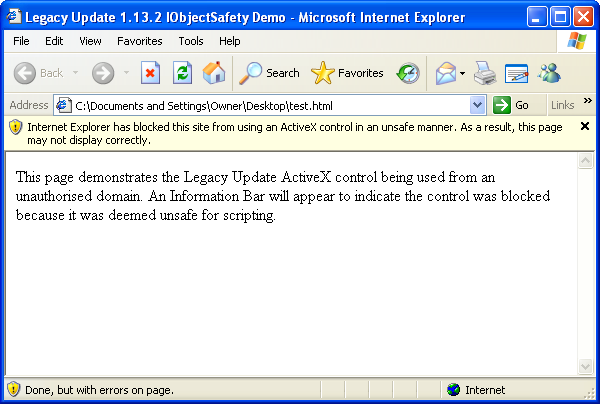
The control now uses the ActiveX object safety feature, signalling to Internet Explorer whether the control is “safe” in the current context. This moves responsibility for enforcing the check from Legacy Update into Internet Explorer itself. Should an unauthorised website attempt to use Legacy Update, you will receive an Information Bar alert: “Internet Explorer has blocked this site from using an ActiveX control in an unsafe manner. As a result, this page may not display correctly.” (Prior to Internet Explorer 6 SP1, a warning dialog is shown.)
-
The control now also confirms that the website is in the Trusted Sites zone. Legacy Update setup adds legacyupdate.net to the Trusted Sites zone automatically. If you install Legacy Update by directly registering LegacyUpdate.dll, you must now also ensure Legacy Update is added to Trusted Sites.
-
On installation or upgrade to 1.13.2 or later, the system is configured to block ActiveX control versions prior to 1.13.2 from being used. This is known as a “killbit”. To ensure the vulnerability remains mitigated, this block is not removed from the registry if you uninstall Legacy Update. Downgrading to an earlier version of Legacy Update will result in the website being non-functional.
Mitigation
Install Legacy Update 1.13.2 as soon as possible. This fixes the bug, and your system will be configured to block vulnerable versions of the Legacy Update ActiveX control.
If you have a reason to not update, limit your use of Internet Explorer to only websites you trust. Using a limited, non-administrator user account will ensure website access to Windows Update is limited. On Windows Vista and later, do not run Internet Explorer as administrator, and do not accept User Account Control dialogs you weren’t expecting.